Decoding the React Context API

I'm a Software developer with more than 1.5 years of well-rounded experience. My skills include HTML, CSS, C/C++, JavaScript, ReactJS, NodeJS and M ongoDB and Docker. I actively seek out new technologies and stay up-to-date on industry trends and advancements. I enjoy being challenged and engaging with projects that require me to work outside my comfort and knowledge set, as continuing to learn new languages and development techniques are important to me and that also leads to success of any organization. Currently looking for a full time role as a MERN stack developer.
Hey! 👋 In this blog, we will be talking about Context API which was introduced in React 16, You will get your answer here about how to use, why to use and so on...
Actually, Many years ago React has offered an experimental API for context. Although it was a powerful tool, its use was discouraged because of inherent problems in the API. Also, most developer were not confident to use it as it's in experimental stage .
In Version 16.3, A new context API that is more efficient and supports both static type checking and deep updates.

What is Context API?
React's context allows you to share information to any component, by storing it in a central place and allowing access to any component which requests it. The state you set in context will be accessible anywhere inside the react tree. Context is kind of universal data store.
Why Context is needed? 🤔
As we know React follows top-down approach. React components are structured as a tree and there is a root node on top to which all the nodes are connected and data flows in one direction from top to bottom.
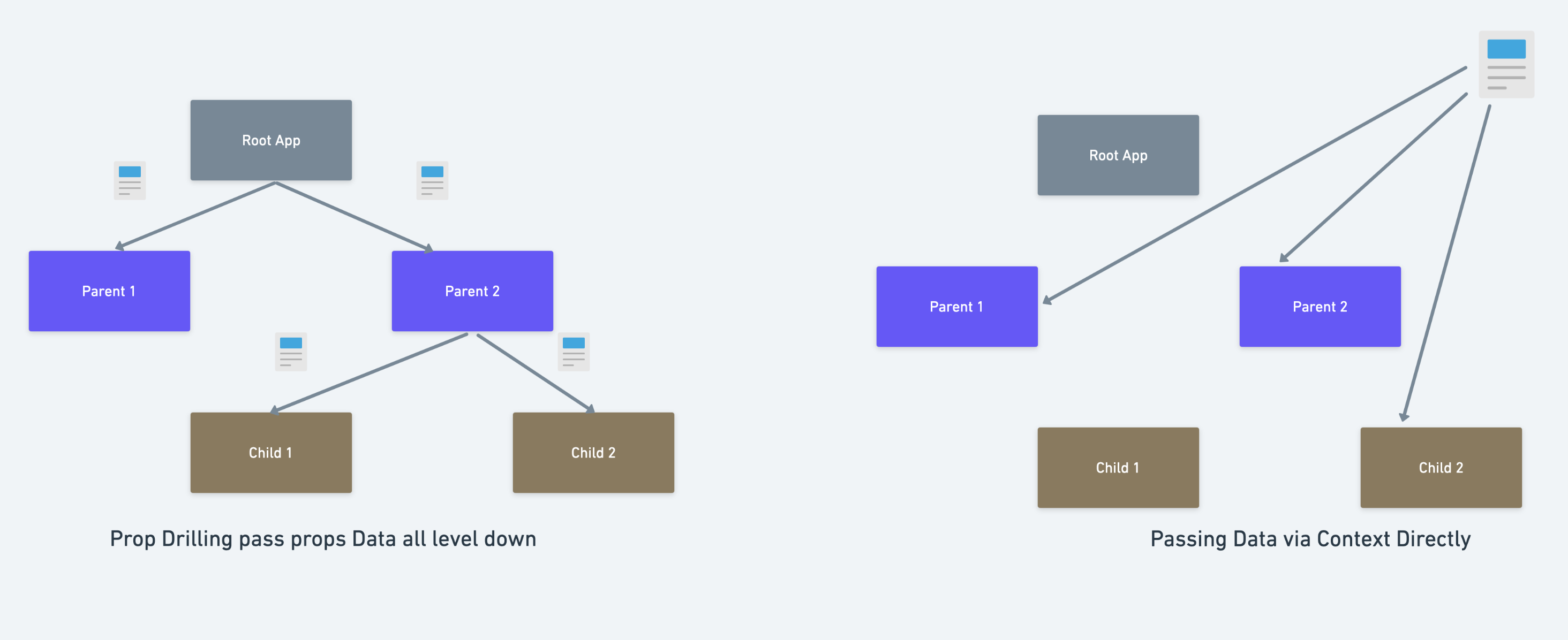
Context provides a way for users to pass data down in a component tree without manually passing props at every level. For example let's explain with the below image here we have a tree with 3 levels and if we want to access data in child2 we can directly do that using context.
Earlier when the context API was in experimental stage then most of the developers are using prop drilling. Prop Drilling is the process in which you pass data from one part of the React Component tree to another by going through other parts that do not need the data but only help in passing it around. So, as per the below image for accessing data in child2 you have to first pass the data from root to parent2 and then only you can access it in child2 whether it is useful in parent2 or not.
So, Now you can imagine how tedious is to work with props drilling in larger web apps.
Is Prop drilling(aka threading) Bad really? 🤭
I should say, Prop drilling isn't all bad because the pattern provides you with a very specific way of passing data using a top-down approach. But sometimes, it's very annoying to specifically pass props down between components, especially when your React application is ten layers or more deeper.
So, now you have understood what context API is all about. Let's deep dive and look how it works. 🏎️
It has mainly 3 blocks.
Context Object
You can define the Context object in a separate file or right next to a component in a component file. You can have multiple contexts within the component as well. Thus, you can store any data you want in the context object which will be accessed globally in your application.
import React from 'react'
const ColorContext = React.createContext({}) // argument is the default starting value
For demo let's create ColorContext.js file, set a colors object and pass a property as an argument to the createContext() method. This will allow the .createContext() method to subscribe the property colors.blue a prop from one component to another.
const colors = {
  blue: "#03619c",
  yellow: "#8c8f03",
  red: "#9c0312"
};

export const ColorContext = React.createContext(colors.blue);
Here if we don't give default value i.e if our default value is undefined then we can't destructure undefined and hence runtime error comes.
None of us likes runtime errors or even any errors 🤫, so your reaction may be to add a default value to avoid the runtime error. However, what use would the context has if it didn't have an actual value? If it's just using the default value that's been provided, then it can't really do much good. 99% of the time that you're going to be creating and using context in your application, you want your context consumers (those using useContext) to be rendered within a provider which can provide a useful value.
There are situations where default values are useful, but most of the time they're not necessary or useful. React docs suggest that providing a default value "can be helpful in testing components in isolation without wrapping them." If you're using Flow or TypeScript then not providing a default value can be really annoying for people who are using React.useContext.
Ok let's continue with the second block.
Context Provider
After creation of context, then we can use the provider, but before that let’s go through what is the Provider and Consumer component and how they work.
Imagine how you travel from location A to location B using flight, you go to the airport entrance with a boarding pass (Context) and then go through the gate (Provider) in order to board the flight. Once you reach the destination you give your boarding pass (context) to the exit gate (Consumer) to consume it.
Similiarly, we wrap the Provider component and pass the context as a value prop around the area where we want to consume the context with Consumer component.
In your index.js file, import your ColorContext function and append to the .Provider component in your return statement. This wraps the context of your ColorContext function to color your application. While your ColorContext function exists in the component tree, the .Provider component will facilitate its functionality throughout. Here, the Home component will absorb the data within your ColorContext function. Child components of Home will also obtain the data from ColorContext.
import React from 'react';
import { ColorContext } from "./ColorContext";

function App() {
  return (
    <ColorContext.Provider value={colors}>
      <Home />
    </ColorContext.Provider>
  );
}
And here comes the third block.
Context Consumer
After we wrapped the Provider component around the section of the app where we want to consume the context. The consumer component will subscribe to the context change with a function component. In other words, in order to use the context, the component will require a function as a child which will get the current context value as an argument. This function will return a React node that will be rendered based on the context value.
In your index.js file, set a .Consumer component to your ColorContext function in your return statement. Whenever the context changes, the .Consumer component will update and adjust your application based on the modification.
[index.js]
return (
  <ColorContext.Consumer>
    {colors => <div style={colors.blue}>Hello World</div>}
  </ColorContext.Consumer>
);
Handling the useContext() Method
In functional components, we can use the hook useContext which makes the life easy. The useContext() method accepts a context within a functional component, and works with a .Provider and .Consumer component in one call. In your index.js file, import the useContext() method and the ColorContext function, and declare a functional component:
import React, { useContext } from "react";
import ColorContext from './ColorContext';

const MyComponent = () => {
  const colors = useContext(ColorContext);

  return <div style={{ backgroundColor: colors.blue }}>Hello World</div>;
};
Internally, Redux uses React's "context" feature to make the Redux store accessible to deeply nested connected components. Now from React Redux version 6, this is normally handled by a single default context object instance generated by React.
Conclusion
Context API is a great way to share your app state between components in the tree when props drilling is getting annoying to deal with. It provides you with built-in functions and components to avoid prop-drilling in your component tree. The React Hook useContext() applies the same functionality in a streamlined, functional component body in one call.

I hope you understood about Context API in detail now. If you enjoyed reading the blog don't forget to share your feedback by using emojis. 😅
If you have any feedback feel free to reach out. You can find me on Twitter.

